- DATE:
- AUTHOR:
- The Thanx team
Links
Toast Revenue Centers
Choose the Toast Revenue Center that gets attached to your Thanx orders, so your digital revenue reconciles automatically in Toast reporting and tip distribution runs without manual cleanup.
 What is it?
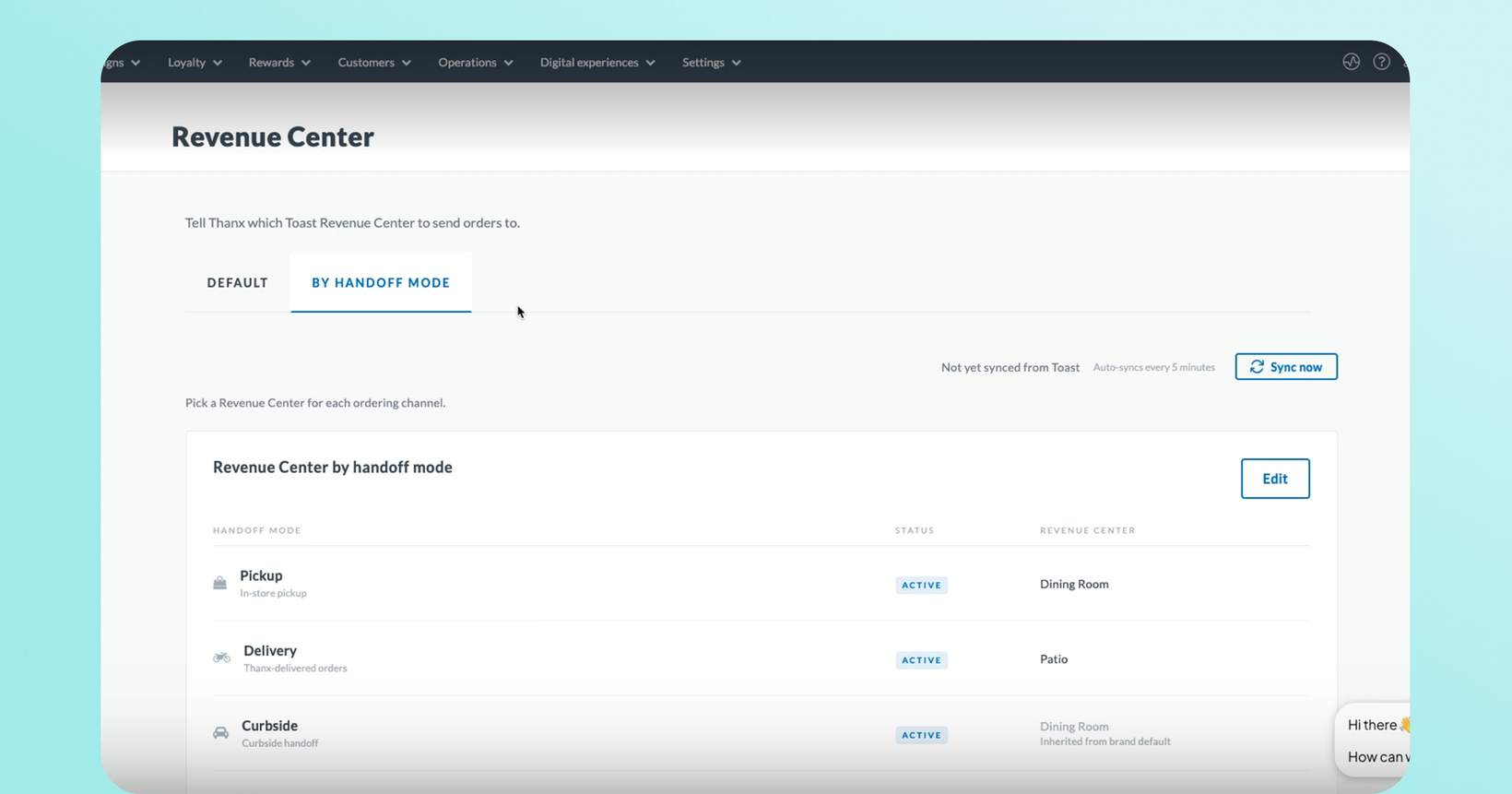
If your brand is on Thanx Ordering powered by Toast, there's a new Revenue Centers page in your Ordering Configuration settings. Your brand's Revenue Centers are pulled live from Toast, so you can search the list and select the one that should be attached to every Thanx order. Set a single Revenue Center for all orders, or a different one per handoff mode — for example, one for Pickup and another for Delivery.
Until now, every Thanx order arrived in Toast with no Revenue Center attached, and there was no way to configure one.
 Why it matters
Your revenue lands in the right bucket. Every Thanx order now flows into the Revenue Center you choose in Toast, so brand-level revenue reporting reconciles automatically and your accounting team gets clean numbers without reclassifying orders by hand.
Tip distribution works without intervention. Tip-distribution platforms like Tip Haus read the Revenue Center on each order to route tips correctly. With one configured, tipped Thanx orders route automatically instead of being corrected order by order.
Split delivery revenue from pickup revenue. Assign a different Revenue Center per handoff mode when you want each channel reporting separately.
Multi-location brands are handled automatically. Pick a Revenue Center by name once and Thanx applies the right one at each of your locations — including new locations you add later, with no need to come back and re-save.
Nothing changes until you're ready. The setting is optional. Leave it unset and your orders continue submitting exactly as they do today.
 How it works
In your Thanx dashboard, go to Ordering Configuration → Revenue Centers.
On the All orders tab, search your Toast Revenue Centers by name and select the one you want attached to your Thanx orders.
(Optional) Switch to the By handoff mode tab to set a different Revenue Center for each handoff mode. Your selections are saved on both tabs, so you can move between them without losing your work.
Save. Every Thanx order submitted from that point forward carries your configured Revenue Center.
To confirm it's working, place a test order and check that it lands under your chosen Revenue Center in Toast reporting rather than "No Revenue Center." If you use Tip Haus, run a tipped test order and confirm the tip routes without manual reclassification.
Managing Revenue Centers uses your existing Ordering Management permission — anyone on your team who can already manage ordering configuration can set this up. There's nothing to request or enable first.
 What to know before you turn this on
It's optional. Until you save a selection, nothing changes — your orders keep submitting with no Revenue Center exactly as they do today.
Only new orders are affected. Orders already in Toast as "No Revenue Center" won't be updated retroactively.
One name-based limitation: if your locations use completely different Revenue Center names for the same channel, this version doesn't cover that yet — submit a feature request if that's your setup.
If a Revenue Center gets archived in Toast, Thanx automatically resubmits the order without it so your guest's order still goes through — but your reporting will look off until you update your selection.
 FAQs
FAQs
Do I have to set this up?
No. It's optional, and there's no migration. If you don't select a Revenue Center, your Thanx orders keep submitting with none attached, exactly as they do today.
My Thanx orders still show "No Revenue Center" in Toast. What's going on?
Orders only start carrying a Revenue Center once you select one and save it on the Revenue Centers page. Confirm you've saved a selection, then check an order placed after that.
Which Revenue Centers appear on Thanx?
We display all the revenue centers you have configured on Toast. If multiple revenue centers share the same name, you will only see the entry once, and the location-specific GUID will be applied accordingly.
Will this fix my past orders?
No. Only orders placed after you save a selection carry a Revenue Center. Thanx orders that already landed in Toast as "No Revenue Center" aren't updated retroactively.
Each of my locations has its own Revenue Center. Will this work?
Usually yes. As long as your locations use the same Revenue Center name, Thanx automatically sends the correct one for each location. If your locations use genuinely different Revenue Centers — a different name at each location for the same channel — that isn't supported in this release. Let your Thanx CSM know your interest in this so we can factor it into what comes next.
Why do I see handoff modes we don't currently offer?
The By handoff mode tab lists every handoff mode Thanx supports, whether or not your brand has it turned on. You only need to set the ones you use.
Can I set a different Revenue Center for delivery versus pickup?
Yes. Switch to the By handoff mode tab and set a Revenue Center for each handoff mode you want to customize. Any mode you don't set individually falls back to your brand default.
Does Thanx pick a Revenue Center for me?
No, and it won't guess. Toast's Revenue Centers don't carry any channel or handoff information, so there's no way to tell which one you intend for delivery versus pickup. You choose, and Thanx sends exactly what you configured.
What happens if I archive a Revenue Center in Toast that Thanx is using?
Your guests are unaffected — the order still goes through as a normal one-click order. But Toast will reject the order with the archived Revenue Center attached, and Thanx will resubmit it without one. Those orders will show an empty Revenue Center and your reporting will be inaccurate until you select a new one in Thanx. Toast recommends against archiving a Revenue Center that's in use.
If you're on Toast, we recommend setting your Revenue Center now so your digital revenue reports cleanly from your very next order. Full setup steps and troubleshooting are in the Toast Revenue Centers help article.
Links