- DATE:
- AUTHOR:
- The Thanx team
- RELATED ROADMAP ITEMS:
- Fixed price rewards

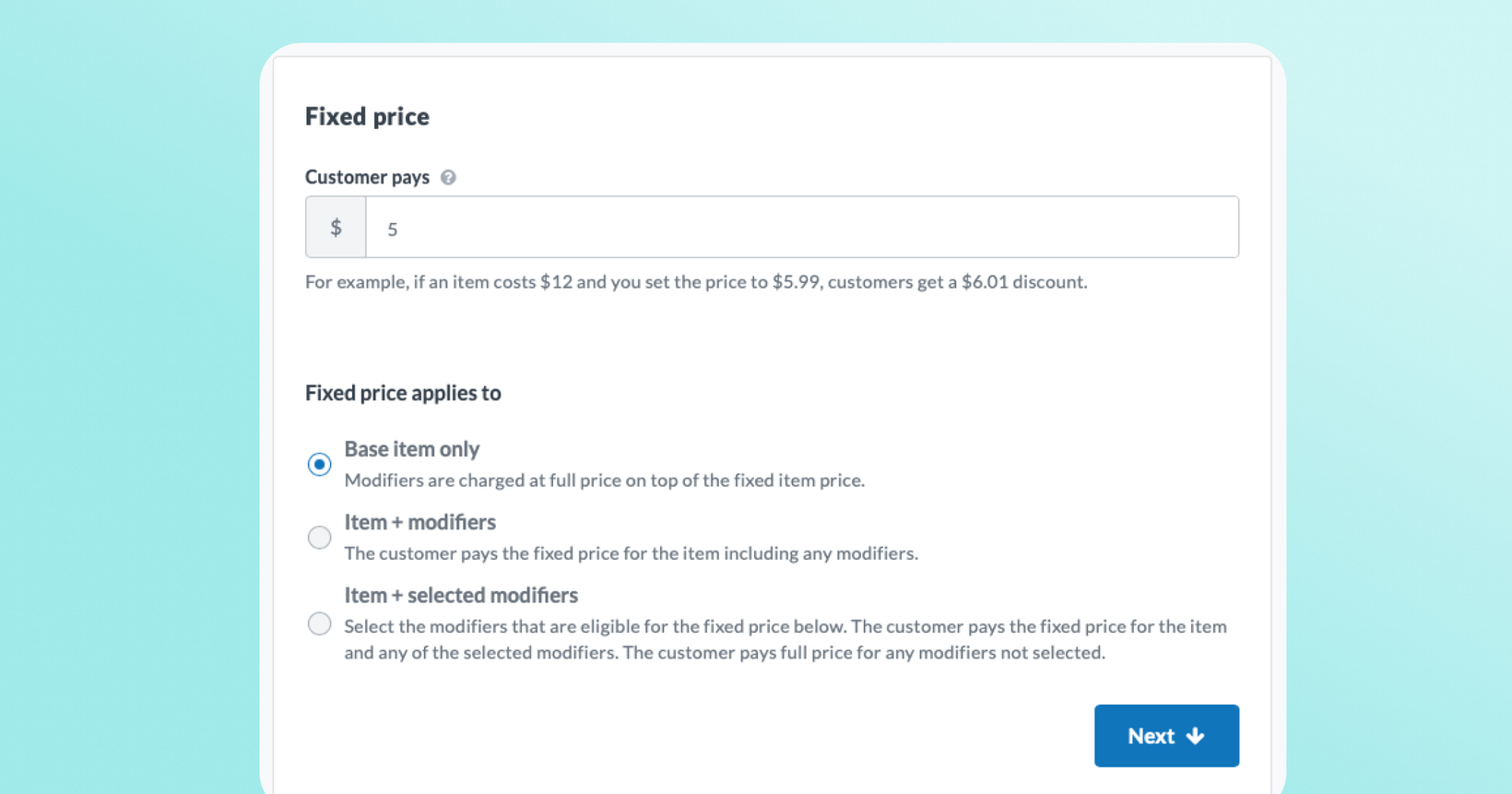
Fixed price rewards— guarantee the price your customers pay
Set a maximum price for eligible menu items to help you run e.g. "Any pizza for $5" or "Any burger for $7" promotions. Thanx automatically calculates the right discount at redemption, delivering a consistent guest experience regardless of item price or location.
 What is it?
Fixed price rewards are a new reward type that sets a maximum price your customers pay for an eligible item. Instead of a fixed-dollar or percentage discount, Thanx calculates the exact discount at checkout based on the item's actual price at that location.
If a fixed price reward is configured with a price cap of $5 and a pizza costs $12, the customer pays $5. If the pizza costs $7, they still pay $5. And if it's already priced below your cap, they pay the regular menu price — no discount applied. Works with any ordering or POS integration that uses Thanx's loyalty APIs.
 Why it matters
Run clean price campaigns, not math problems — "Any burger for $5" is a stronger promotion than "$5 off any burger.”
Works across every location automatically — The discount adjusts per location based on actual menu prices, so your national campaign works correctly everywhere without manual overrides.
Flexible for complex menus — Whether you price items at the base level or through size modifiers, you can configure the fixed price to match exactly how your menu works.
Consistent experience for your customers — Guests always see and pay exactly what your promotion promises, regardless of where they order.
 How it works
Go to Rewards → Reward Templates in your Thanx Dashboard
Click "Create a new reward template"
Select "Fixed Price" as the reward type
Name the reward (internal only — e.g., "Pi Day $5 Pizza")
Set the Price Cap — the maximum your customer pays (e.g., $5.00)
Choose the Discount Scope — what the fixed price covers:
Base item only — Customer pays $5 for the item; modifiers cost extra
Base item + all modifiers — Customer pays $5 total, including any toppings or add-ons
Base item + selected modifiers — Item and specific modifiers are bundled; others cost extra
Selected modifiers only — For menus where the base item is $0 and the size or add-on carries the price (i.e. Pizza' is $0, 'Medium' modifier is $9)
Add Item Restrictions to specify which menu items qualify
Set the Redemption Method (online, in-store, or both)
Send a test to verify the reward calculates correctly, then Activate
At checkout, Thanx calculates the discount automatically: if the qualifying item costs more than your cap, the customer pays the cap amount. If multiple qualifying items are in the cart, the discount applies to the lowest-priced item, not the highest-priced.
 Keep in mind
The price cap cannot be set to $0 — this will be supported in a future release.
Each redemption covers one qualifying item. To discount multiple items in a single order, use a multi-use reward or separate reward templates.
When a customer has multiple qualifying items in their cart, the discount applies to the lowest-priced one.
If your POS and online menus structure pricing differently (e.g., modifier pricing online but not at the POS), consider using digital-only or in-store-only redemption to simplify setup.
 FAQs
FAQs
What's the difference between "Fixed Price" and a dollar-off reward?
A dollar-off reward gives a set discount regardless of item price (e.g., "$5 off any pizza"). A fixed price reward sets what the customer actually pays (e.g., "Any pizza for $5"). The discount cost may vary per item and per location, but the customer price stays consistent.
What if the item is already priced at or below my price cap?
No discount is applied. The guest pays the regular menu price. For example, if your cap is $5 and a small pizza costs $4.50, the customer pays $4.50.
Can I set the price cap to $0 for a free item?
Not currently. This may be enabled in a future release. Please reach out to your Thanx Customer Success Manager to communicate your interest in this functionality.
How does this work for locations that charge different prices for the same item?
That's the core benefit. The discount is calculated at redemption based on the actual menu price at that location. A $5 cap applies a $7 discount where pizza costs $12, and a $2 discount where it costs $7 — the customer always pays $5.
Which discount scope should I use if I price by size (e.g., Small/Medium/Large as modifier prices)?
Use Selected modifiers only. This applies the fixed price to the modifier (the size) rather than the base item, which is typically $0 for size-as-modifier formatted menus.
Why are there multiple discount scope options?
Restaurant menu structures vary — some brands price at the item level, others through size modifiers. The different configurations ensure the reward calculates correctly for your specific menu setup. If you're unsure which to use, reach out to your Thanx Customer Success Manager.