- DATE:
- AUTHOR:
- The Thanx team
- RELATED ROADMAP ITEMS:
- 86ed item display control
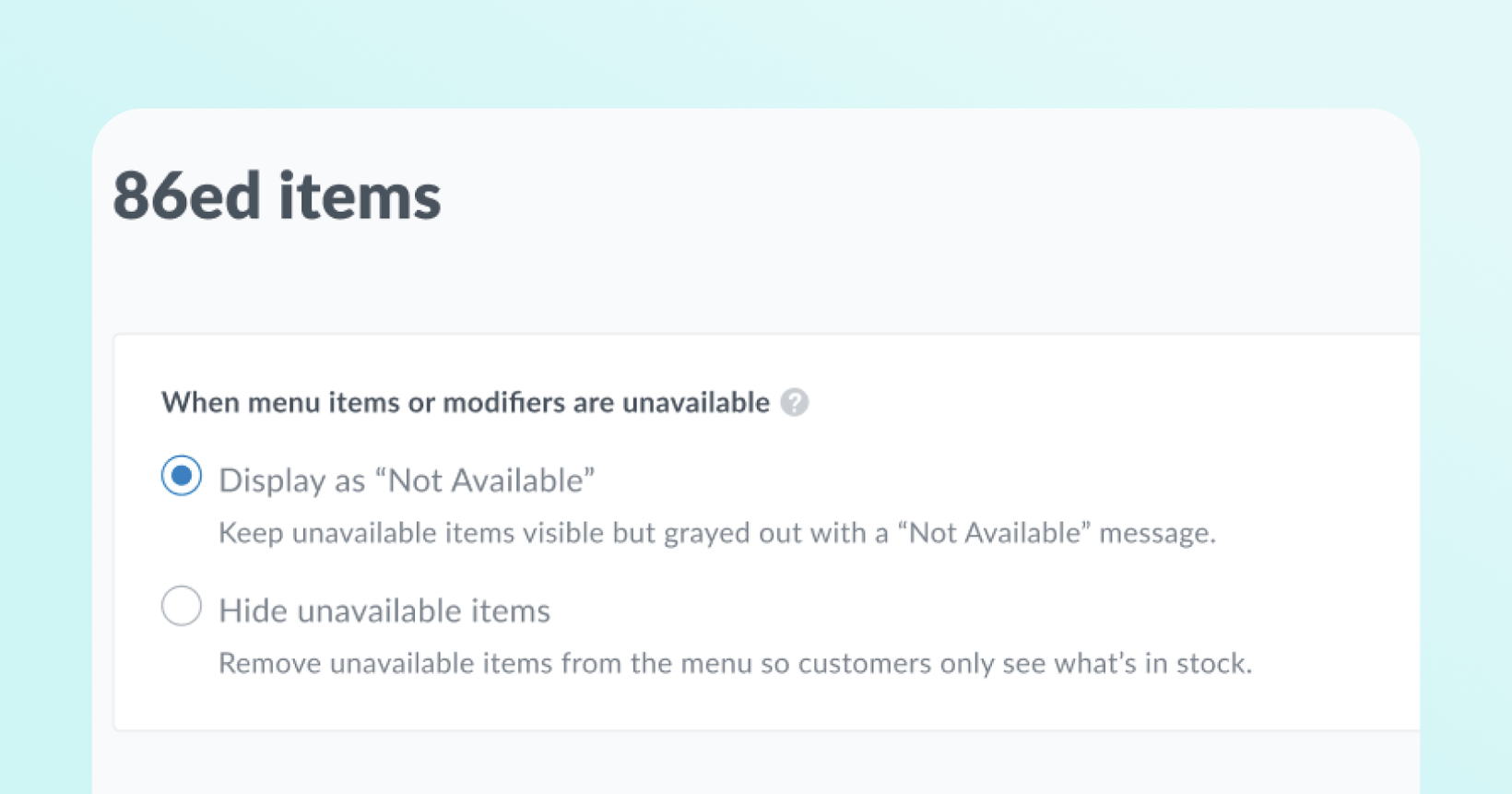
Coming soon: Hide 86ed items and modifiers from the menu
Starting Wednesday, April 8th, Thanx is updating how 86ed items and modifiers display on your digital ordering menu. Read on to find out if any action is required on your end before the change goes live.
 What’s coming
Soon, you’ll be able to hide 86ed (out-of-stock) menu items and modifiers on customer-facing digital ordering menus. Choose between displaying out-of-stock items and modifiers as grayed out with "Not Available" messaging, or hiding them from the menu entirely.
 Why it matters
Different operators have different needs when an item or modifier runs out. Some restaurants want customers to see that an item exists but is temporarily unavailable, while others prefer a cleaner menu that only shows what items can be ordered. This control lets you match your menu display to your operational style whether you're managing a temporarily 86ed item or permanent menu management across locations.
 How it will work
Choose between two display states for 86ed items and modifiers:
Display as Not Available (default): Out-of-stock items and modifier options remain visible on the menu but appear grayed out at reduced opacity with "Not available at this time" text. Customers can see the item exists but cannot add it to their cart.
Hide Unavailable Items: Out-of-stock items and modifier options are completely removed from the customer-facing menu until they are back in stock.
The default for all brands will be Display as Not Available.
For items, this matches existing behavior, so there is no change from the existing functionality.
For modifiers, this is new: 86ed modifiers were previously always hidden. Starting April 8th, they will appear grayed out unless you update your setting. Once you save and publish your selection, the change takes effect on the next menu load. No manual refresh required.
If your restaurant uses 86'ing as a menu management tool (e.g., to control which items appear at specific locations), we recommend switching to the "Hide Unavailable Items" setting for both menu items and modifiers for the best guest ordering experience.
 Important to Note:
Previously, all 86ed modifiers were hidden. Starting April 8th, modifiers will follow your 86ed visibility setting. Merchants on the default "Display as Not Available" will see grayed-out modifiers where they were previously hidden. If you want 86ed modifiers to stay hidden, update your setting to "Hide Unavailable Items" before April 8th.
If your brand uses Olo, you must have the "include disabled" setting enabled in Olo, or 86ed items won't be sent to Thanx at all.
As part of this release, Settings will be moving to its own home in the main navigation. It will no longer be located under Digital Experiences → Brand & Content.
 Where you’ll find it in Thanx
Navigate to: Settings → Ordering → 86ed Items
Step-by-step:
Log into the Merchant Dashboard
Select Settings
Click into the Ordering section
Select the 86ed Items tab
Choose your preferred display option
Click Publish — a green success banner will confirm your changes are live
 FAQs / Gotchas / Exceptions
Will my 86ed items change behavior automatically after this update?
For items, no — 86ed items have always appeared grayed out, so that experience stays the same. For modifiers, yes. Previously, 86ed modifiers were always hidden. Starting April 8th, they will appear grayed out by default. If you want them to stay hidden, update your setting to "Hide Unavailable Items" before April 8th.
Does this affect modifier options (add-ons), or just top-level items?
Both. When set to "hidden," 86ed modifier options are excluded from the product detail view. When set to "Display as Not Available," they appear grayed out with "Not available at this time" text.
Which ordering providers are supported?
Olo and Toast. Support for other providers is coming in Q2.
How quickly does a setting change take effect?
Immediately on the next menu load. Customers who already have the menu open will see the change on their next page refresh or navigation.
What happens if a customer has an item in their cart that gets 86ed before checkout?
The standard "items removed" modal is shown at checkout, regardless of the visibility setting. The visibility setting only controls how 86ed items appear during menu browsing.
What happens if every item in a category is out of stock?
If every item in a category is 86ed and the setting is "hidden," the category is also hidden. If every item in a category is 86ed and the setting is “Display as Not Available,” the category will still be there with all items grayed out.