- DATE:
- AUTHOR:
- The Thanx team
Richer push notifications with expandable messages, deep linking and image support
Push notifications just got a major upgrade. Your push notifications can now be formatted so that guests can see a bold title separate from the body, expandable body text, and an image that enhances your marketing message. You also have the option to choose where guests land in-app or at an external destination when they tap.
 What is it?
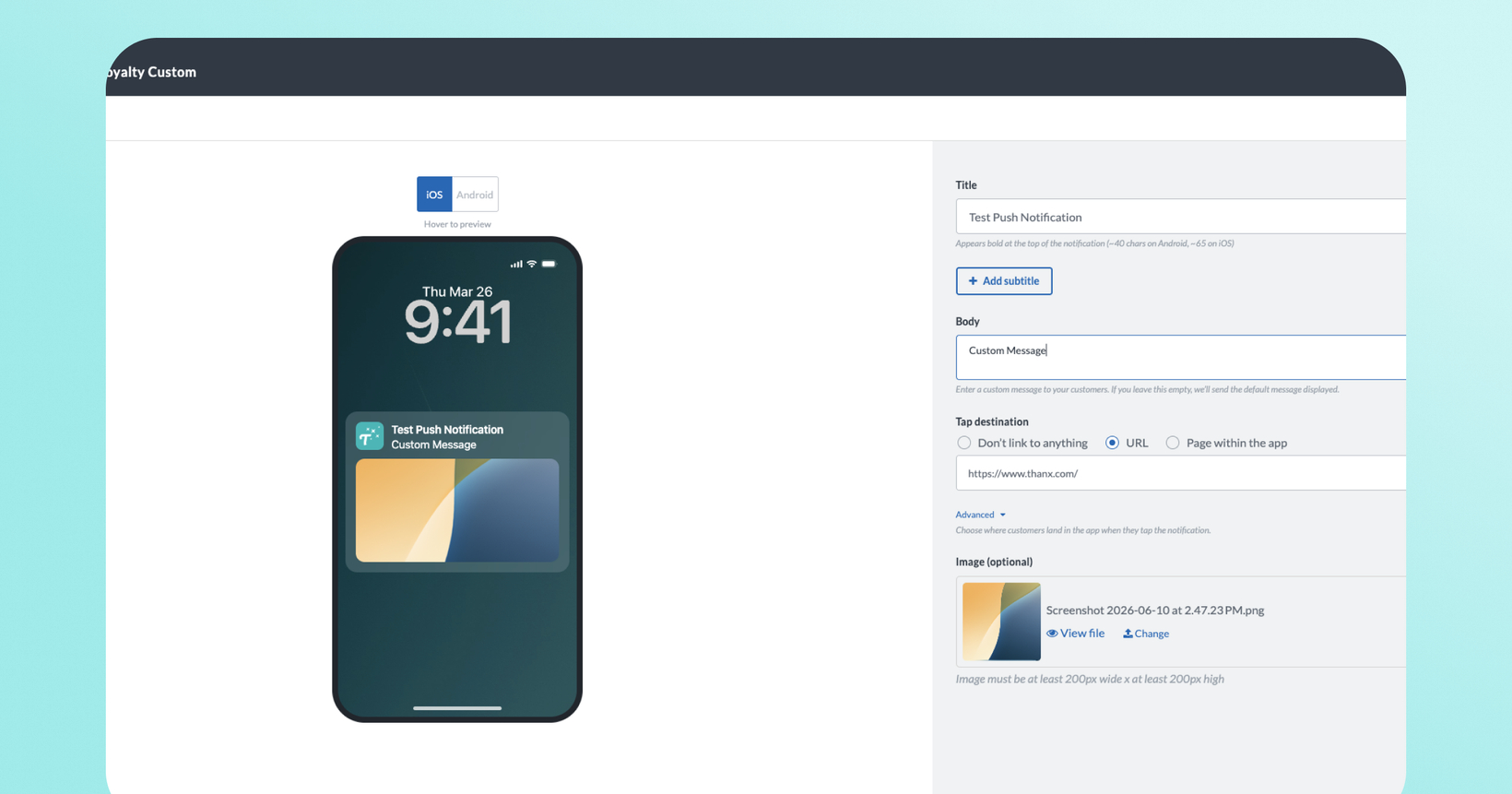
Clean, modern notifications with clear messaging for guests — no more truncated text cutting off offer details or one flat block of text. The campaign builder for push notifications includes separate Title, Subtitle, and Body fields, optional image upload, as well as a live preview that shows exactly how your notification will appear before you send.
Visually, title and body text are now formatted distinctly, and rich images render inline. Notifications are also expandable on both platforms — guests can long-press (iOS) or tap-to-expand (Android) to see your full message.
 Why it matters
Your full message, every time. Notifications now expand on iOS and Android, so customers always see the complete offer, reward, or update you wrote — not a clipped version.
No more dashboard guessing. Character limits in the builder now match what iOS and Android actually display. What you preview is what your guests receive.
Richer campaign notifications. Add a title, subtitle, and promotional image to your campaign push notifications, giving them the same visual quality as other modern marketing channels.
Send guests to the right place. Add a deep-link URL to campaign notifications so customers land directly on the relevant page in your app when they tap.
Consistent across all notifications. All notifications (reward earned, expiring rewards, and more) now render correctly on modern devices.
 How it works
For campaign push notifications (Campaign Center)
Go to Campaign Center and open or create a campaign that includes a push notification.
In the push builder, you'll now see separate fields for Title, Subtitle (iOS only), and Body.
Optionally upload an image for promotional campaigns.
Use the live preview to see how your notification will render on iOS and Android before sending.
Under Tap destination field, send guests directly to a specific page in the app or a custom URL when they tap.
Send as normal. Your full message will reach customers on both iOS and Android.
For all other notifications
All back-end notifications (reward earned, expiring rewards, and more) now render correctly on modern devices. No action needed.
 FAQs
FAQs
Do I need to do anything to enable this?
No action is required. Expandability and accurate character limits apply automatically to all notifications. To use the new Title, Subtitle, image, and deep-link fields, open a push notification in Campaign builder and the new fields will be there.
Which notification types get the new composer fields?
The new Title, Subtitle, Body, Image, and Tap destination fields are available for campaign push notifications in Campaign Center.
What happens to push notifications I've already set up?
Existing campaigns continue to work. Your current push text carries over as the Body field. No changes to live campaigns are required.
Will images show on all devices?
Images are supported on modern iOS and Android devices. Older devices will fall back to the text-only version of the notification.
What's the character limit now?
The character limit for the title is 65 characters. For the subtitle, 40 characters and for the body, 240 characters. However, keep in mind, a 65 character title will visually truncate on Android.
Can I add images to backend notifications like "Reward Earned"?
Not as part of this release. We are working on this in a future project.