- DATE:
- AUTHOR:
- The Thanx team
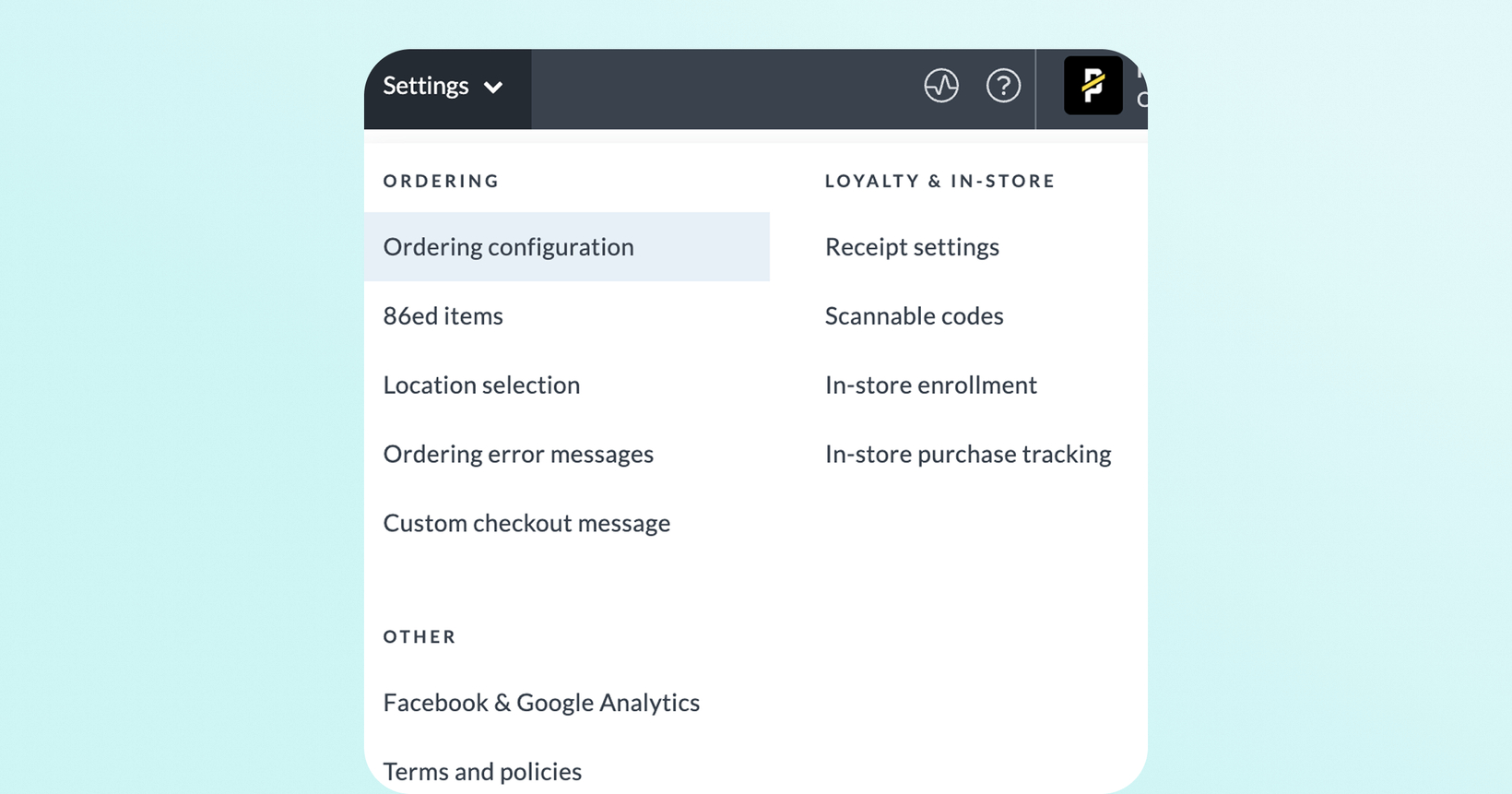
Find your loyalty and ordering settings in a new dashboard section
Your Settings page now has a dedicated home in the dashboard, making it faster to find and configure loyalty and ordering settings.
 What is it?
The Settings page has moved to its own standalone section. It's no longer tucked under Digital Experiences → Brand & Content and now lives at the top navigation header, “Settings.”
 Why it matters
Previously, settings were buried under Brand & Content in the dashboard, making it easy to miss certain capabilities that could meaningfully impact your loyalty experience. This change puts your important loyalty controls front and center so you can quickly discover, adjust, and activate features like in-store enrollment, delivery logic, and analytics integrations without hunting through the dashboard menu.
Whether you're onboarding, optimizing, or troubleshooting, faster access to Settings means faster impact.
 How it works
No action needed on your end! All of your existing configurations have been preserved. From the Settings page, you can configure and control:
Ordering configuration: See exactly what ordering parameters like menu item images, category order, and pricing you can configure directly with your ordering provider and have Thanx honor automatically.
Ordering error messages: Customize the static error messages guests see during digital ordering failures.
Delivery defaults: Define how delivery orders are routed. Require customers to order from the nearest eligible location, or give them the flexibility to order from any store.
Location selection: Control whether customers must manually select a store before starting a new order on app or web
Receipt settings: For card-linked loyalty brands, customers can upload receipts in-app to earn points on purchases. View which receipt types are accepted and configure whether proof of payment is required.
86ed item visibility control: Brands can now choose how 86ed (out-of-stock) items and modifiers appear on customer-facing online ordering menus. The display options include grayed out items or items completely hidden from view.
Scannable codes: Enable QR codes so customers can quickly identify themselves at the POS during in-store visits. Customize the information displayed in-app for a seamless check-in or reward redemption experience. (POS-integrated brands only)
In-store enrollment: Set the right moment to prompt guests to sign up at the POS, maximizing loyalty enrollment without disrupting the checkout flow. (POS-integrated brands only)
In-store purchase tracking: Get a clear view of your loyalty model and how in-store purchase data flows into your program.
Terms and policies: Own and manage the terms and policy documents your customers agree to when creating a loyalty account — keeping your brand in control of compliance.
Facebook and Google Analytics: Connect your Meta pixel and Google tags to track ordering conversion metrics and measure the ROI of your digital loyalty experiences.
 Where to find it in Thanx
Dashboard → Top Navigation Bar → Settings
Step-by-step:
Log into the merchant dashboard
Go to top navigation bar or header
Select Settings