- DATE:
- AUTHOR:
- The Thanx team
Toast multi-menu visibility now available
Toast brands can now launch and operate on Thanx using their existing menu structure. This includes support for multiple menus, time-of-day and day-of-week scheduling, and Toast-controlled visibility. If you don’t need to support multiple menus, you can continue to use your Thanx-specific menu, however all brands need to be on Toast's latest API version with partner-specific visibility by June 30th.
 What is it?
Thanx now supports displaying multiple Toast menus simultaneously. This means you can control which menus appear on Thanx directly from the Toast dashboard. You can now display your existing Toast menus in Thanx - including time-of-day and day-of-week scheduling - and control visibility directly from your Toast dashboard.
We’re excited to roll this out as the new default for all new brands launching on Thanx + Toast. If you’re currently using Toast Ordering and managing a single Thanx-specific menu, you can easily transition to get multi-menu visibility. If you don’t need to support multiple menus, you can continue to use your Thanx-specific menu, however all brands need to be on Toast's latest API version by June 30th. Please reach out to your Thanx Customer Success Manager to start the process. Our support team will also be following up with each Toast brand to discuss this further.
 Why it matters
Previously, Toast brands launching on Thanx had a more manual setup, since menus needed to be organized into a Thanx-specific structure. With this update, you can keep Toast’s native time-based and day-specific menus (like Taco Tuesdays) intact, making LTOs, menu changes, and per-location updates a breeze. You will also no longer have to rely on the Thanx team to enable new menus for online ordering. All management of your menus should be done in Toast.
This enhancement of our Toast Ordering integration unlocks:
Multiple menus support: this includes time-of-day and day-of-week menus
Visibility is respected at every level: items set to POS-only or hidden from ordering partners in Toast are automatically hidden in Thanx across menus, categories, items, and modifiers.
Changes sync in ~5 minutes: new items, 86s, and schedule changes are all reflected in Thanx automatically.
Menu management all in Toast: Enable and manage all menus in your Toast dashboard. No need to reach out to Thanx anymore to enable new menus for your direct online ordering channels.
 How it works
In Thanx:
There are no changes required in the Thanx dashboard. Contact your Customer Success Manager to get the process started in upgrading your existing menu configuration.
In Toast, here’s how to make your menus visible to Thanx:
Go to Menu Manager in Toast
Select Full menu then select the menu(s) you want on your Thanx ordering experience
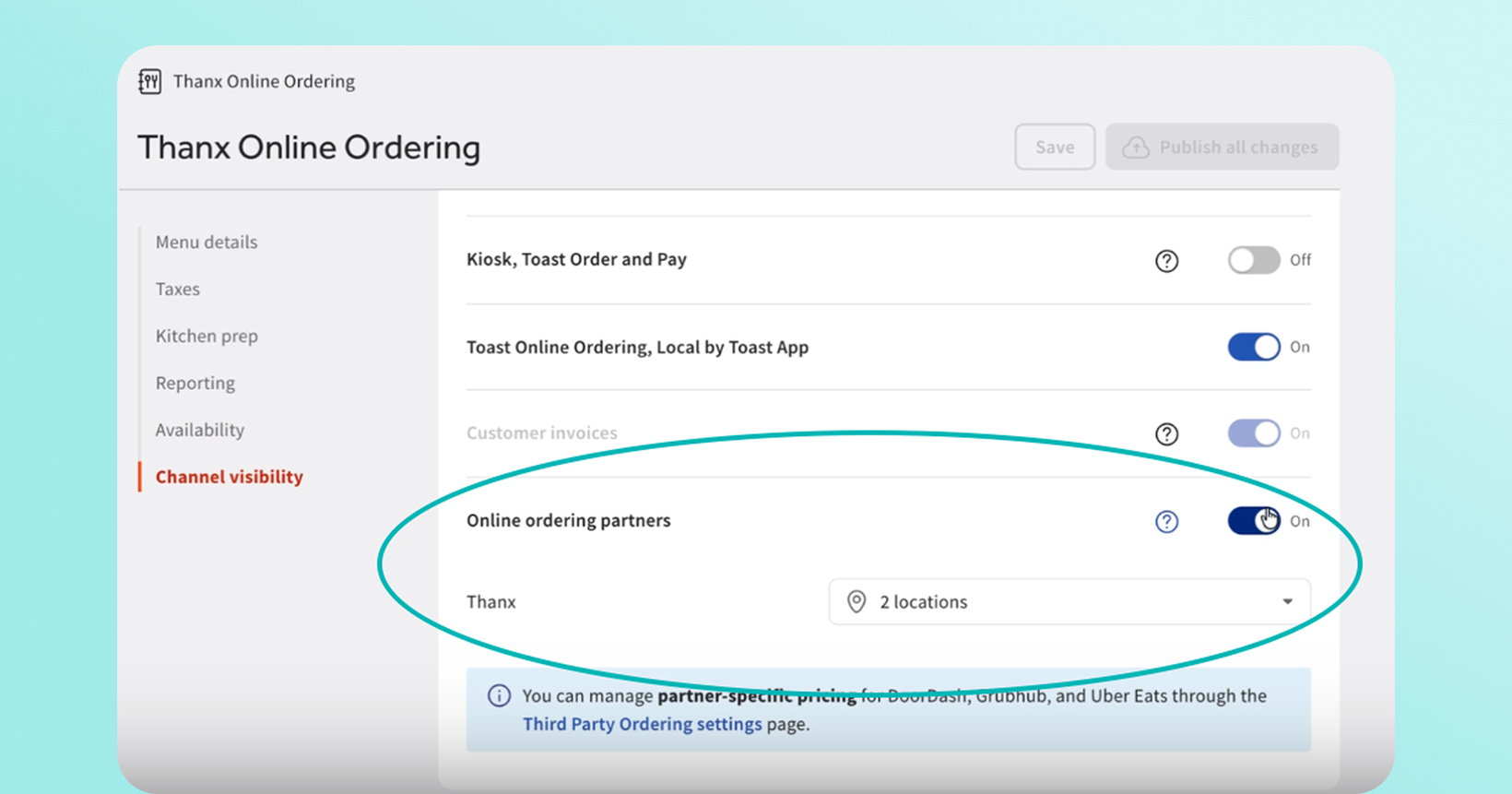
Scroll to Channel Visibility and toggle on Online ordering partners
Select Thanx from the partner list
Confirm Thanx is selected for all locations (not just the restaurant group level)
Ensure that your other menus are not visible to Thanx (if they are, Thanx will display those menus as well).
Save your changes. The sync to Thanx should happen within ~5 minutes
Important to Note:
For time-based menus, we recommend setting availability hours and days in Toast's Menu Manager. Use 23:59 as the end time (not 00:00), and ensure no gaps exist between consecutive menus.
If you’re using a hidden menu in Toast, we recommend that you separate the Hidden Menu to be a menu on its own. You’ll need to confirm that the hidden menu is only selected for Thanx under Channel Visibility and not other third-party platforms.
Menu Groups in Toast appear as Categories in Thanx (the same approach DoorDash uses). The top-level Menu name isn't displayed to customers — categories come from the Menu Groups within each menu.
It is worth revisiting your SKU item rewards to make sure they are valid across your full menu.
If multiple menus contain categories with identical names, they will appear as separate category tabs.
If you don’t need to support multiple menus, you can continue to use your Thanx-specific menu, however all brands need to be on Toast's latest API version with partner-specific visibility by June 30th. Please reach out to your Thanx Customer Success Manager to start the process. Our support team will also be following up with each Toast brand to discuss this further.
 Where to find it
All configuration is managed in your Toast Menu Manager under Channel Visibility settings. No action needed in the Thanx dashboard.
 Step-by-step guide: Toast Menu Visibility and Multiple Menus
 Where to find Channel Visibility in your Toast Menu Manager Loom Tutorial
 FAQs
FAQs
Do I need to do anything in the Thanx dashboard?
Nope, simply let your Thanx Customer Success Manager know that you would like to upgrade to Toast’s multi-menu support. All of the configuration takes place in Toast Menu Manager so that it syncs to Thanx automatically.
What if I don’t need to support multiple menus?
No worries, you can continue to use your Thanx-specific menu, however we will migrate all Toast ordering brands to Toast's latest API version with partner-specific visibility by June 30th. You will continue to designate your Thanx-specific menu to appear on your Thanx online ordering experience. Please reach out to your Thanx Customer Success Manager for support.
Do I have to update any Free menu item rewards when I move over to multi menu support?
Yes, when you transition to multi-menu support, make sure to check your SKU item rewards to confirm that they are valid across all menus. For example, if you offer a 'Free Coffee' reward, confirm the reward includes the Coffee item from each menu where it appears.
What if the same item appears in multiple menus?
It will appear once per menu in Thanx (e.g., "Coke" in both Lunch and Dinner menus appears in both). To avoid this, use a shared "Beverages" menu instead.
Can I use a price markup for DoorDash while keeping standard prices on Thanx?
Yes. Toast supports per-partner price markup. You can set a markup for DoorDash without affecting your Thanx pricing.
How does scheduling work for future orders?
Menu availability is based on the fulfillment time, not when the order is placed. If a customer orders at 9am for 11am pickup, they see the lunch menu (available at 11am), not the breakfast menu.
What about subgroups?
Subgroups will be displayed by default for all brands live on Thanx before March 2026. Subgroups will appear as separate categories alongside other categories, not nested within them. Subgroups are hidden by default in Thanx for new brands launching on Thanx after March 2026, matching how other ordering platforms handle them. If your brand uses subgroups for customer-facing content and you would like to hide subgroups, reach out to your Thanx CSM.